Freight Rate Management Software Explained
Freight Rate Management Software Explained: Definition & basics
What is freight rate management software
Freight rate management software is a tool that helps freight forwarders, 3PLs and transport companies control carrier pricing data from ingestion through to customer quote.
It handles rate files, fuel surcharges, validity dates, zone tables, weight breaks and quote logic in one controlled workflow, replacing the fragile mix of spreadsheets, inboxes and manual calculation that most pricing teams rely on today.
What does it actually do
At its core it performs six functions:
- ingesting carrier rate files (however messy),
- normalising inconsistent charge structures,
- supporting quote generation from current rate data,
- applying surcharge logic consistently,
- showing margin visibility before a quote is sent, and
- maintaining an audit trail back to source rates.
Without that control, pricing becomes fragile: sales waits for pricing, pricing teams dig through spreadsheets, old rate cards and inboxes.
Old carrier rates get reused. Surcharges are missed. Quotes go out with assumptions nobody can defend later.
Freight rate management software is designed to close that gap between carrier cost and customer commitment.
If those rates are not controlled, the pricing workflow becomes fragile.
That is the commercial problem freight rate management software is meant to solve.
Who uses rate management software
Primarily pricing teams, sales teams and tender managers at freight forwarders, 3PLs and transport companies. Operations teams typically use separate freight forwarding or TMS platforms: rate management software targets the commercial pricing workflow specifically.
What freight rate management software should do
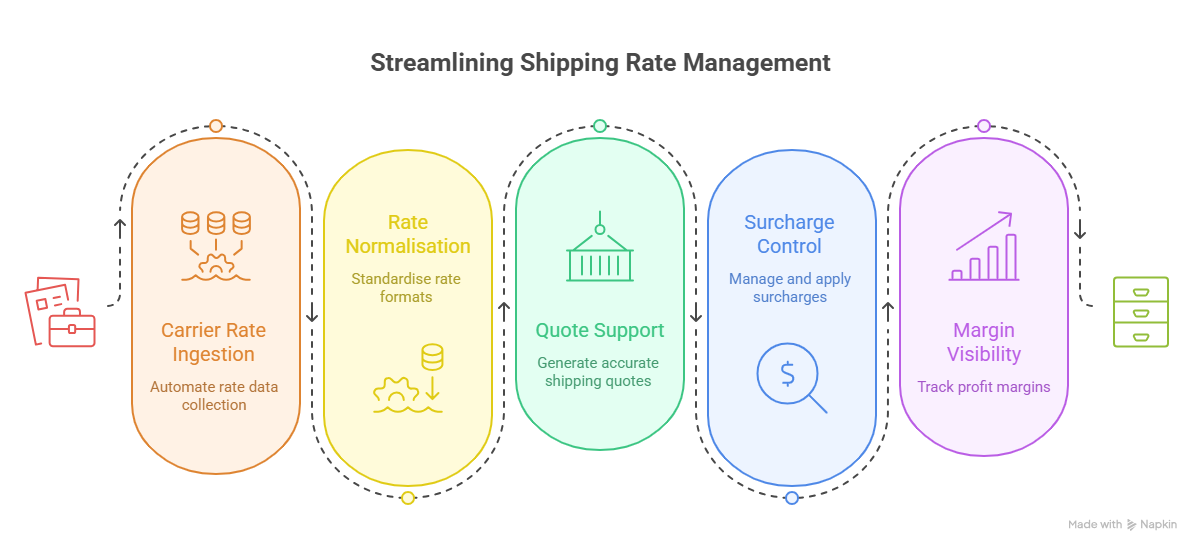
At minimum, freight rate management software should help teams control six core pricing workflows:
1. Carrier rate ingestion
The first problem is getting rates into a usable structure. Carrier rate sheets are rarely clean. A useful system should help extract the relevant rate data, including lanes, zones, validity periods, weight breaks, minimum charges and surcharges.
For Fretara, this is the natural starting point: messy carrier files in, controlled pricing data out. Exact supported file types still need product validation before public claims are made.
Example: one carrier sends rates in Excel, another sends zone tables as a PDF, and another hides fuel levy rules in an email attachment. Before quoting can begin, the pricing team has to turn all of that into usable pricing data.
2. Rate normalisation
Different carriers describe similar charges in different ways. If the team cannot normalise those differences, quoting becomes manual interpretation.
Rate normalisation means turning inconsistent source files into a cleaner structure the team can search, compare and apply.
Example: one carrier calls a charge a "Security Fee", another calls a similar charge "Risk Handling". One uses postcode zones, another uses country groups. Without normalisation, the team is not comparing like with like, and pricing decisions become harder to defend.
3. Quote support
The software should make it easier to produce a customer quote from current rate data. That does not mean removing human judgement. Freight pricing often needs context. But the system should reduce manual lookup, version drift and formula risk.
Example: when current rates are hard to find, sales teams often fall back to old spreadsheets, previous quotes or copied formulas. That is how outdated pricing, missed surcharges and margin leakage creep into the quoting process.
4. Surcharge control
Surcharges are a common source of pricing mistakes. Fuel, accessorials, security, handling, minimums and mode-specific charges need to be visible and applied consistently.
Example: a road carrier updates diesel surcharge weekly while another updates monthly. One applies it per shipment, another per kg. Without controlled surcharge logic, sales teams often quote outdated fuel values or apply the wrong charging basis.
5. Margin visibility
A rate is not useful unless the team understands the commercial outcome. Pricing teams need to see buy cost, sell price, markup, exceptions and margin risk before the quote is sent.
Example: a quote may appear profitable until accessorials, fuel and handling costs are included. Margin visibility helps teams identify low-margin or loss-making quotes before sending them to customers.
6. Audit trail
When a quote is challenged later, the team should know which rate, surcharge and rule created it. Without an audit trail, pricing decisions become hard to defend.
Example: if a customer disputes a charge three months later, the team should be able to trace exactly which carrier file, surcharge rule and pricing logic were used to generate the quote.
Why spreadsheets break down
Spreadsheets work for small teams but become risky as volume, carrier count and mode complexity grow.
The usual issues are familiar:
- multiple active versions
- hidden formulas
- manual copy-paste errors
- old carrier files still being used
- surcharge changes missed by one team
- quote logic living in someone's head
- no clean link between rate, quote and invoice
A spreadsheet can support a small team. It struggles when quoting volume, carrier count, mode complexity and tender pressure increase.
When pricing knowledge lives in spreadsheets, inboxes and individual team members, scaling becomes difficult. New pricing staff rely on tribal knowledge instead of controlled workflows, while pricing consistency becomes harder to maintain across branches, customers and transport modes.
What causes margin leakage in freight quoting
Margin leakage usually comes from outdated carrier rates being used, surcharges that are missed or applied at the wrong basis, accessorial charges not accounted for in the quote, and formula errors in manual spreadsheets. A quote can appear profitable until fuel, handling and minimum charges are included, and without margin visibility before sending, those gaps only surface at invoice time.
Rate management software handles that automatically, preventing your margins from leakage.
How outdated carrier rates hurt quotes
When sales teams cannot find current rates easily, they fall back to old spreadsheets, previous quotes or copied formulas.
This introduces pricing from expired rate periods, misses rate changes the carrier sent via email and creates quotes the pricing team cannot defend if challenged.
The commercial risk compounds when rate files arrive as PDFs or poorly structured Excel sheets that nobody has yet processed. And this is another reason why freight forwarders use rate management software.
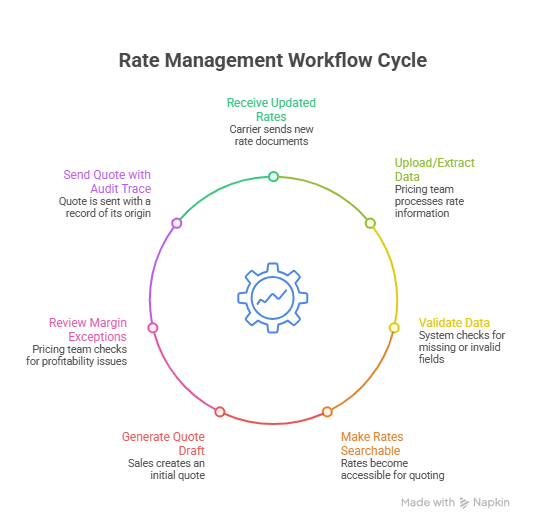
What a typical workflow using rate management software looks like
Instead of relying on spreadsheets and expanding teams with more employees to handle them, more and more companies choose to automate processes to improve ROI and productivity.
- Carrier sends updated XLS/PDF rates
- Pricing team uploads or extracts rate data
- System validates missing zones, validity dates and surcharge fields
- Rates become searchable for quoting
- Sales generates quote draft
- Pricing module reviews margin exceptions
- Quote is sent with audit trace to source rates
Freight rate management vs freight forwarding software
Freight forwarding software usually manages the broader operating workflow: shipments, documents, milestones, customs, accounting and operational handoffs.
Rate management is narrower and more commercial focused.
A company may have a strong freight forwarding system and still have weak rate management if pricing teams are working around it with spreadsheets and inboxes.
That is why Fretara should not position itself as a full freight forwarding system replacement.
| Area | Freight Rate Management Software | Freight Forwarding Software |
|---|---|---|
| Primary focus | Pricing, carrier rates, quoting and margin control | End-to-end freight operations and shipment execution |
| Main users | Pricing teams, sales teams, tender managers | Operations teams, customs teams, finance, customer service |
| Core goal | Generate accurate, commercially viable quotes faster | Manage shipment lifecycle and operational workflows |
| Typical data handled | Carrier rates, surcharges, tariffs, margins, tender pricing | Shipments, bookings, documents, invoices, tracking milestones |
| Key workflows | Rate ingestion, rate normalisation, quote generation, surcharge logic, margin visibility | Shipment management, customs processing, documentation, billing, tracking |
| Carrier file processing | Designed to structure messy XLS, PDF and email rate sheets | Often relies on external uploads or manual rate setup |
| Tender management | Frequently supports RFQs, lane pricing and scenario modelling | Usually not a core strength |
| Auditability of quotes | Tracks which rates, surcharges and rules created the quote | Tracks operational events rather than pricing logic |
| Typical operational issue | Sales teams quoting from outdated spreadsheets | Shipment visibility and process coordination gaps |
| Relationship with spreadsheets | Aims to replace manual pricing spreadsheets | Often still depends on spreadsheets for pricing workflows |
| Integration role | Often integrates into TMS/ERP/forwarding systems | Often acts as the operational system of record |
| Business impact | Faster quotes, more pricing consistency, improved margin control | Better shipment execution, process visibility and operational efficiency |
| Example outcome | Reduce manual rate processing and quoting effort | Manage bookings, customs and shipment tracking in one system |
What freight rate management software is not
Freight rate management software is not:
- a full TMS,
- a carrier procurement platform,
- or a replacement for pricing strategy.
Its role is operational pricing control: maintaining usable rate data, applying pricing logic consistently, and reducing commercial risk during quoting.
That said, rate management software should not operate in isolation. When selecting a platform, freight teams should make sure it can integrate smoothly with existing operational systems, including TMS platforms, CRMs, ERP systems, quoting tools and accounting workflows.
In practice, strong integrations help reduce duplicate data entry, improve pricing consistency across systems and create a cleaner flow between carrier rates, customer quotes, shipment execution and invoicing.
What buyers should look for
Before buying freight rate management software, ask:
- Can it handle the rate files we actually receive?
- Can it support sea, air and road workflows we need today?
- How does it manage rate validity and updates?
- How are surcharges captured and reviewed?
- Can pricing teams set markup rules or approval steps?
- Does it create customer-ready quotes or draft quote data?
- How does it flag missing or suspicious rate data?
- What integrations or import/export options exist?
- Can we see an audit trail from rate to quote?
Where Fretara fits
Fretara fits as a rate and pricing control layer for freight teams.
It is not trying to replace every freight forwarding, TMS or ERP platform. The sharper role is to sit beside existing systems and clean up the messy commercial workflow between carrier rates and customer quotes.
Fretara helps teams turn inconsistent carrier files into usable pricing data, apply quote logic more consistently, and protect margin before a quote reaches the customer.
That is the practical problem: not "more freight software", but fewer pricing mistakes between buy rate, sell rate and final quote.
Learn more about how AI helps Freight Forwarders turn carrier rate sheets into quotes.
Bring one real carrier rate file to a Fretara walkthrough. We'll show how it could be structured, checked and turned into quote-ready pricing data.